Where the Hermes board actually lives
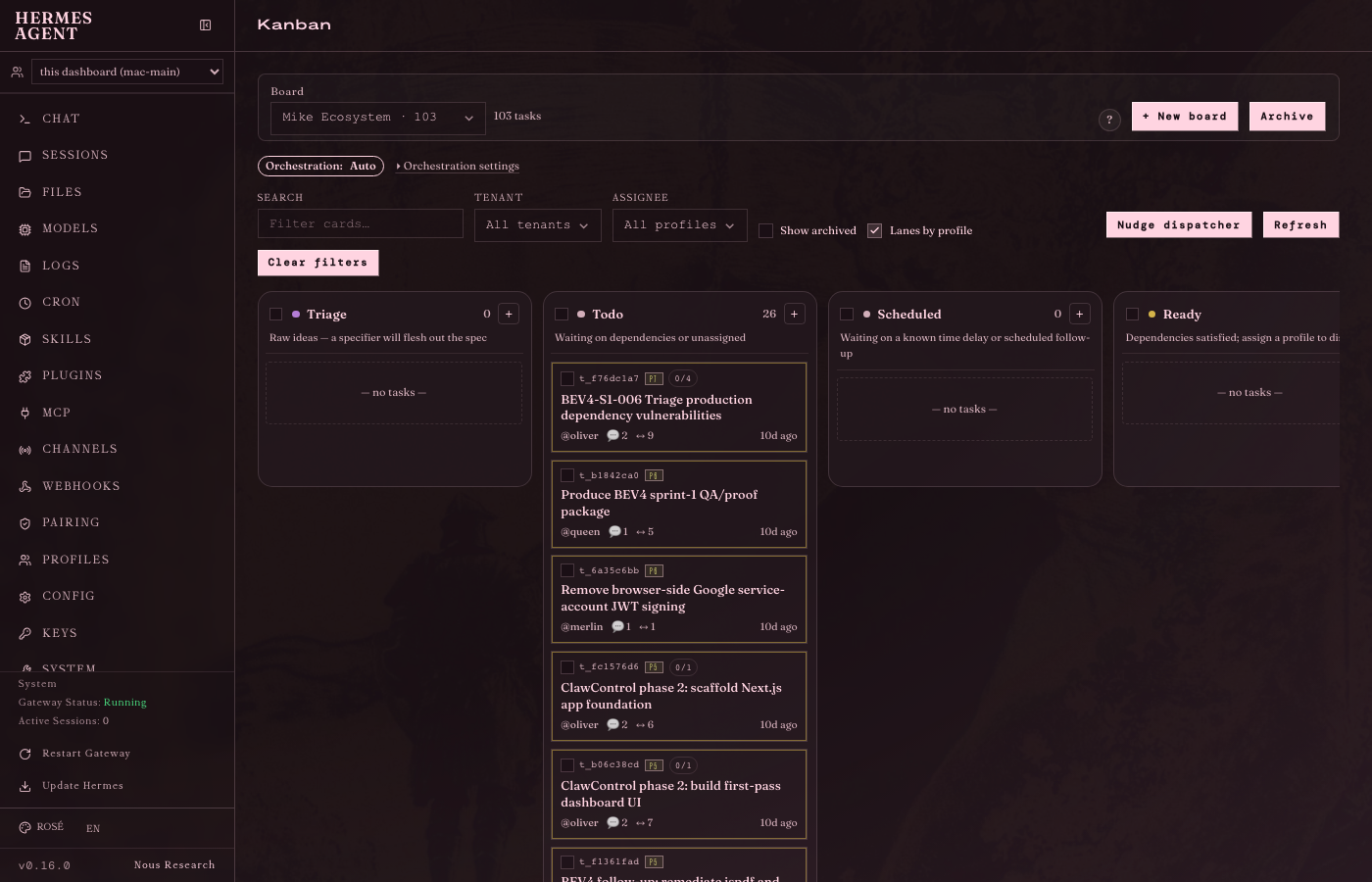
The full kanban board at localhost:9119/kanban — real columns, real tasks, real toolbar
The kanban board runs on the Mac at http://localhost:9119/kanban. Over Tailscale you can reach it from any machine at http://michaels-mac-studio.tail9fd706.ts.net:9119/kanban. There is also a native Electron app at /Applications/Hermes.app that shows the same UI in a window. Auth is automatic: a session token is injected into the page, no login form.
- Web: http://localhost:9119/kanban (same machine as Mac mac-main)
- Tailscale: http://michaels-mac-studio.tail9fd706.ts.net:9119/kanban (any device)
- Native app: /Applications/Hermes.app (same UI, windowed)
- Sidebar routes: Chat, Sessions, Files, Models, Logs, Cron, Skills, Plugins, MCP, Channels, Webhooks, Pairing, Profiles, Config, Keys, System, Documentation, plus plugin tabs Kanban and Achievements.
How a task moves through the board
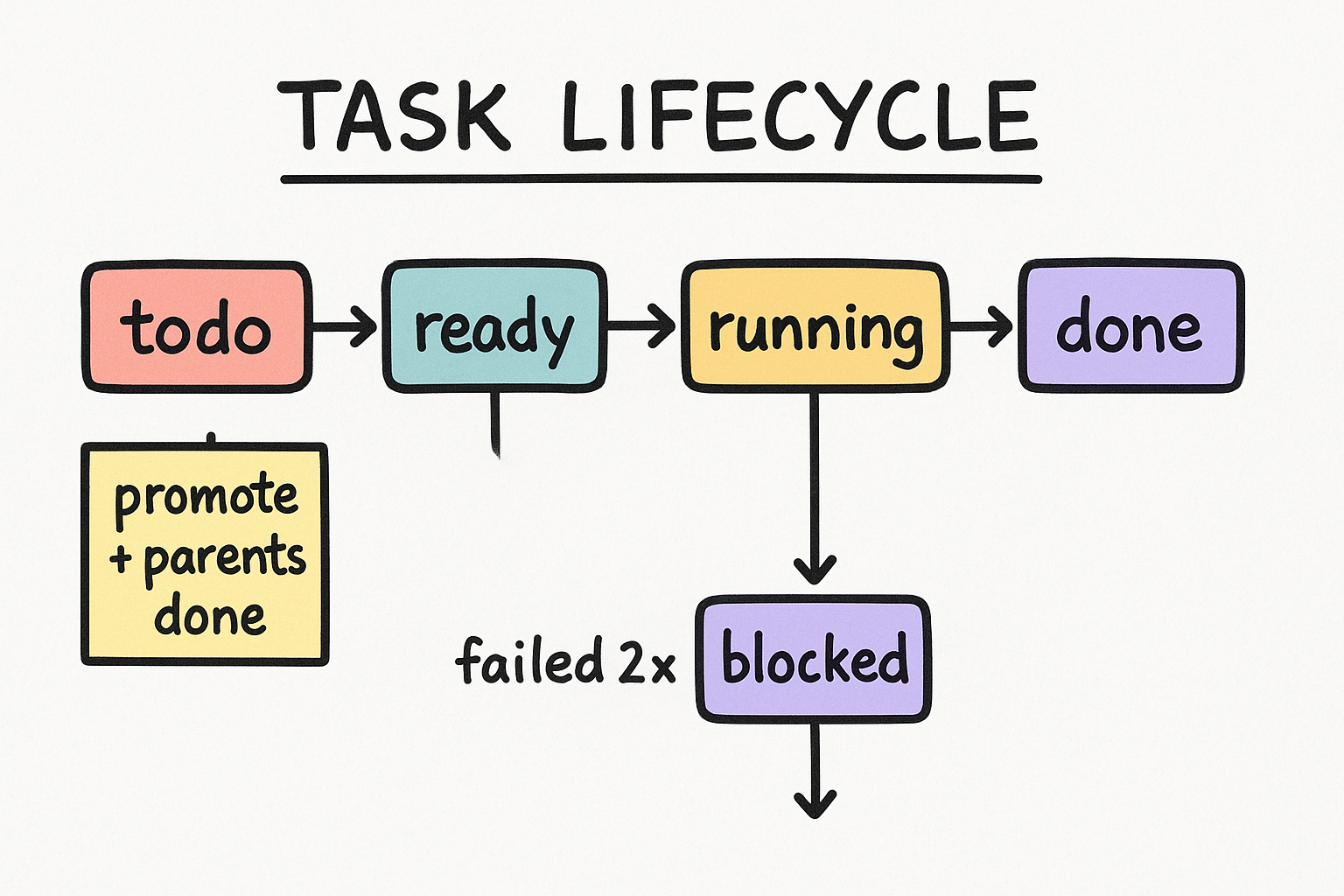
Tasks travel through states: triage, todo, scheduled, ready, running, blocked, review, done, and archived. The dispatcher ONLY picks up tasks in ready status. A task does NOT auto-advance to ready on its own: it needs a promote AND all of its parent tasks must already be in done status. The server enforces this. Setting ready returns HTTP 409 if a parent is not done. Setting running manually returns HTTP 400 because only the dispatcher can do that.
- triage: brand new, needs specifying before anything else.
- todo: specified, waiting for a promote and for parents to be done.
- ready: eligible for the dispatcher to claim on the next tick.
- running: an agent worker holds an active claim. You cannot set this manually.
- blocked: worker failed failure_limit times (default: 2). Needs human review.
- done: completed. Children can now be promoted.
Every control inside a task, and what it does
Click any task card to open the detail panel on the right
Click any task card to open its detail panel. Here is every control and the action behind it.
Editable text. Click to rename the task.
Markdown rich text. Full formatting supported.
Choose from: triage, todo, scheduled, ready, running, blocked, review, done, archived. Cannot set running manually (HTTP 400). Cannot set ready if a parent is not done (HTTP 409). Setting blocked writes a block reason and sends a notification.
Dropdown of agent profiles registered on the board. If a task has an assignee, only that agent can claim it. If empty, any agent can claim it. Reassign can optionally kill the in-flight run first.
0 to 10. The dispatcher picks the highest-priority ready task each tick. Default is 0.
Free text shown when status is blocked. Shown in the task card and the detail panel.
The dependency chain. A child cannot go ready until all parents are done. You can add or remove parent/child relationships here.
Threaded human and agent comments on THIS task. This is the closest thing to per-task chat. You add comments in the panel; the running agent also posts updates here.
Timeline of every lifecycle event: created, promoted, claimed, spawned, heartbeat, completed, failed, blocked. Each entry has a timestamp and a run ID.
Auto-written by the worker when it finishes or goes to blocked. Read-only. This is where the agent explains what it did.
The agent's final output on completion. Shown after done status.
Upload files to the task (max 25MB each). Download or delete them from here.
Per-platform toggles (Telegram, Discord) so the task pings Mike on completion or when blocked. Configured homes: Discord Merlino server and Telegram Mike DM.
Appear when a task is running with a stale claim. Reclaim = force-release the claim. Reassign = move to another agent. Terminate run = stop the active run without deleting the task.
Runs an LLM to flesh out the task description and auto-promotes it to todo. Only visible on triage tasks.
Removes the task permanently. The trash icon. No undo.
The Chat tab is a full embedded terminal, not per-task chat

The Chat tab in the sidebar is NOT per-task chat. It is a full embedded Hermes terminal (the TUI) running in the browser using xterm.js over a websocket PTY. You are chatting with the running gateway agent, which is the mac-main profile running claude-opus-4-8. You can give it tasks, ask questions, run skills, and it can create kanban tasks from chat. For talking about a SPECIFIC task, use that task's Comments thread in the task detail panel, not the Chat tab.
- Chat tab = embedded terminal (xterm.js over websocket PTY).
- You are talking to the mac-main gateway agent (claude-opus-4-8).
- Can create kanban tasks from chat, run skills, ask anything.
- For talking about a SPECIFIC task: use the Comments thread in that task's detail panel.
How task assignment works: it is agent profiles, not human users

Assignment is by agent profile, not by human user. Currently active profiles claimable on the board: carlos, cody, dan, frankie, hawkeye, knox, linx, mac-main, matteo-jr, memz, merlin, oliver, petey, queen, raven, sherlock. If a task has an assignee set, only that agent's worker will claim it on a dispatch tick. If assignee is empty, any agent can claim it, first come first served per tick. New tasks with no assignee default to oliver (the orchestrator lane). Reassigning a running task can optionally kill the in-flight run first.
- Assignee = agent profile name, not a human person.
- Set assignee to route work to a specific agent lane.
- Leave empty for first-available (defaults to oliver).
- Active profiles: carlos, cody, dan, frankie, hawkeye, knox, linx, mac-main, matteo-jr, memz, merlin, oliver, petey, queen, raven, sherlock.
The orchestration settings, and why they are already correct
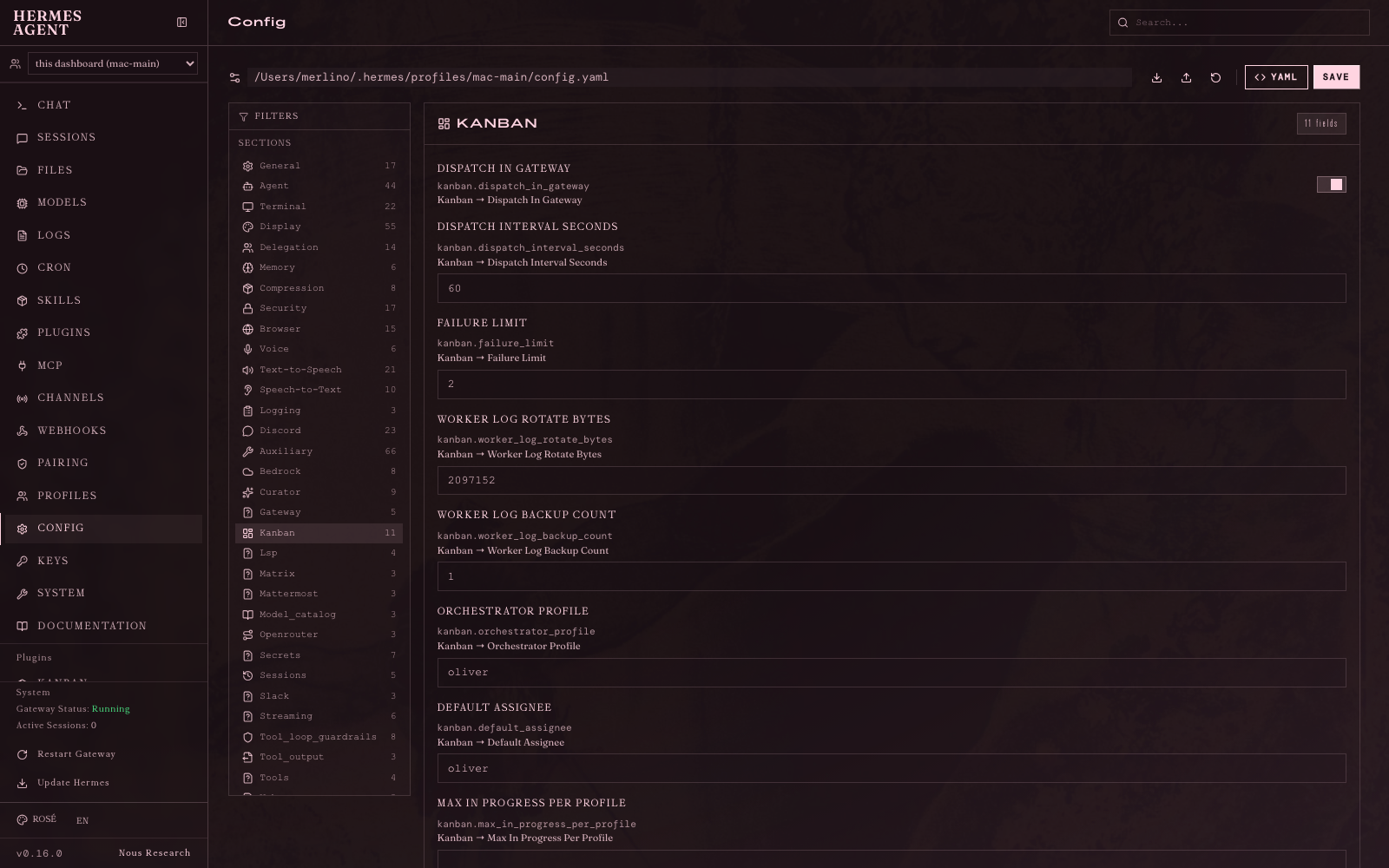
Config -> Kanban: all 11 orchestration fields, verified correct 2026-06-20
These 11 fields live in Config -> Kanban in the Hermes dashboard (see screenshot). ALL of them match the working fleet pattern. Nothing needed changing. This was verified by a live proof run on 2026-06-20 where a task went from todo to ready to running to done in 91 seconds on claude-opus-4-8.
| Field | What it controls | Current value |
|---|---|---|
| Dispatch In Gateway | Auto on/off switch. true = dispatcher runs automatically every tick. | true |
| Dispatch Interval Seconds | How often the dispatcher checks for ready tasks. | 60 |
| Failure Limit | After this many worker failures, the task goes to blocked. | 2 |
| Worker Log Rotate Bytes | Max log file size before rotation. | 2097152 (2 MB) |
| Worker Log Backup Count | Number of rotated log files to keep. | 1 |
| Orchestrator Profile | The agent that decomposes and orchestrates parent tasks. | oliver |
| Default Assignee | Where unassigned new tasks route by default. | oliver |
| Max In Progress Per Profile | Cap on concurrent tasks per agent. null means no cap. | null (unlimited) |
| Auto Decompose | Parent tasks automatically spawn child tasks. | true |
| Auto Decompose Per Tick | Max child tasks spawned per 60s tick. | 3 |
| Dispatch Stale Timeout Seconds | A task with no heartbeat for this many seconds gets auto-reclaimed. | 14400 (4 hours) |
Auto vs manual, and what every board toolbar button does
The board toolbar at the top: New Board, Archive, Reset Errors, Nudge, and filters
Auto vs manual is the Dispatch In Gateway config flag, not a board button. When set to true the dispatcher fires every 60 seconds on its own. The board toolbar has additional controls for bulk operations and view switching.
- New Board: creates a new kanban board (you can have multiple boards).
- Archive: bulk-archives completed tasks to clean up the board.
- Reset Errors: bulk-resets all failed/blocked tasks back to ready in one click.
- Nudge Dispatcher / Refresh: fires one dispatch cycle right now instead of waiting up to 60 seconds.
- All Profiles dropdown: filter the board to show only tasks assigned to one agent.
- Show Archived toggle: reveal or hide archived tasks.
- Lane By Profile toggle: switch to swimlane view where each row is one agent instead of status columns.
The 6-step recipe to get a task from todo to done

This is the complete playbook. The only variation is blocked tasks: you need to clear the blocked parents first because children cannot go ready until parents are done.
- 1Make sure the task's parent tasks are all in done status.
- 2Open the task, set Assignee if you want a specific agent. Leave empty for oliver or any.
- 3Set Status to ready (or use the promote action). If it refuses with HTTP 409, a parent is not done yet.
- 4Click Nudge Dispatcher in the toolbar, or wait up to 60 seconds for the auto tick.
- 5Watch it go: ready to running to done. If it lands in blocked, open it and read the Latest Summary and Events for the reason.
- 6Blocked? Fix the root cause, clear the block reason, set status back to ready, and nudge again.